
UI/UX Development Course for Designing Engaging Experiences
In Association with








Start Your Journey
Complete the form to get closer to your goal.
UI/UX
Real-time insights into the fastest growing tech sector of 2026
6 LPA
Average annual salary for UI / UX developers
5k+
UI / UX developer career opportunities
37.5%
Compound annual growth rate of UI / UX design market
Career-Focused UI / UX Design Course at DIGIT innovations
The UI / UX Development course at DIGIT innovations equips students with the essential skills to create engaging and user-friendly digital interfaces. The curriculum covers the entire design process, from understanding user needs and research to developing wireframes, prototypes, and visual designs. Students will explore design thinking, interaction design, usability principles, and prepare portfolios to advance their careers in UI / UX design.
Benefit from the guidance of industry-leading instructors who bring extensive real-world knowledge and experience, offering personalized mentorship throughout your learning experience. Engage in hands-on projects that allow you to not only learn but also apply your skills in practical contexts.
UI / UX
UI Design & Prototyping
Journey to Design Excellence
Explore our UI / UX curriculum, from basics to advanced concepts
UI / UX

Introduction to UI/UX Design
Overview of UI and UX
Importance of UI/UX
UI vs UX

Design Principles
Color Theory
Typography
Layout and Composition
Visual Hierarchy

User Research
Understanding User Needs
Conducting Surveys and Interviews
Creating User Personas
User Centered Design
User Analysis
Design Thinking

User Interface Design for Digital Devices
Fundamentals of UI Design
UI Principles
Creative Design
Mobile Interfaces
Web Interfaces

Wireframing and Prototyping
Introduction to Wireframing
Low-fidelity vs. High-fidelity Prototypes
Interactive Design
Design Tools
Design Process

Figma for UI Design
Setting Up Figma
Figma Interface Overview
Creating Frames, Components, and Assets
Collaborative Design in Figma
Designing Responsive Layouts

Photoshop for UI Design
Introduction to Photoshop
Working with Layers and Masks
Creating UI Elements
Image Editing and Optimization for the Web

Adobe Illustrator for UI/UX Design
Introduction to Adobe Illustrator
Working with Shapes and Paths
Creating UI Icons and Vector Assets
Typography and Text Effects
Designing Illustrations for UI
Color Management and Styles
Wireframing and UI Concepts in Illustrator
Preparing Assets for Web and Mobile
Illustrator + Figma Workflow

Interaction Design and Usability Principles
Principles of Interaction Design
Creating Interactive Prototypes in Figma
Micro-interactions and Animations

Usability Testing
Conducting Usability Tests
Analyzing Feedback
Iterating Designs

HTML 5 : Basics to Advanced Concepts
HTML5 tags
Header, Nav, Main, Section, Article tags
Aside, Figure, Dialog, Details, Summary and Footer tags
Mark, Figcaption, Code and Cite tags
Audio and Video tags
The input tag new attributes and values
Buttons, Datalist, Required, Placeholder and Autofocus
Using HTML tags in real-time websites
HTML Validators

CSS 3 : Transform Your Website
CSS 3 Advanced Selectors
nth-child() and nth-of-type
first-of-type and last-of-type
first-child and last-child
first-line and first-letter
before and after
CSS 3 Properties
Rounded corners
Advanced Background Properties
Shadow Property
New font properties
Opacity, Gradients
Transition and Transform properties
Animation properties

Final Project
Complete UI/UX Design Project
Presenting Designs
UI / UX
Introduction to UI/UX Design
Overview of UI and UX
Importance of UI/UX
UI vs UX
Design Principles
Color Theory
Typography
Layout and Composition
Visual Hierarchy
User Research
Understanding User Needs
Conducting Surveys and Interviews
Creating User Personas
User Centered Design
User Analysis
Design Thinking
User Interface Design for Digital Devices
Fundamentals of UI Design
UI Principles
Creative Design
Mobile Interfaces
Web Interfaces
Wireframing and Prototyping
Introduction to Wireframing
Low-fidelity vs. High-fidelity Prototypes
Interactive Design
Design Tools
Design Process
Figma for UI Design
Setting Up Figma
Figma Interface Overview
Creating Frames, Components, and Assets
Collaborative Design in Figma
Designing Responsive Layouts
Photoshop for UI Design
Introduction to Photoshop
Working with Layers and Masks
Creating UI Elements
Image Editing and Optimization for the Web
Adobe Illustrator for UI/UX Design
Introduction to Adobe Illustrator
Working with Shapes and Paths
Creating UI Icons and Vector Assets
Typography and Text Effects
Designing Illustrations for UI
Color Management and Styles
Wireframing and UI Concepts in Illustrator
Preparing Assets for Web and Mobile
Illustrator + Figma Workflow
Interaction Design and Usability Principles
Principles of Interaction Design
Creating Interactive Prototypes in Figma
Micro-interactions and Animations
Usability Testing
Conducting Usability Tests
Analyzing Feedback
Iterating Designs
HTML 5 : Basics to Advanced Concepts
HTML5 tags
Header, Nav, Main, Section, Article tags
Aside, Figure, Dialog, Details, Summary and Footer tags
Mark, Figcaption, Code and Cite tags
Audio and Video tags
The input tag new attributes and values
Buttons, Datalist, Required, Placeholder and Autofocus
Using HTML tags in real-time websites
HTML Validators
CSS 3 : Transform Your Website
CSS 3 Advanced Selectors
nth-child() and nth-of-type
first-of-type and last-of-type
first-child and last-child
first-line and first-letter
before and after
CSS 3 Properties
Rounded corners
Advanced Background Properties
Shadow Property
New font properties
Opacity, Gradients
Transition and Transform properties
Animation properties
Final Project
Complete UI/UX Design Project
Presenting Designs
Track Your Progress Toward Enrollment
Follow these four milestones to transform your career. From registration to your first class, we've made it seamless.
Registration
Register online, provide details, help admissions understand your career goals.
Test
Submit application, then an assessment ensures eligibility and program aptitude.
Offer Applicable
After review, eligible candidates get scholarship offers and confirmation email.
Fee Payment
Review your admission offer, promptly pay fee to confirm enrollment.
Mentor Community
Our mentor community at DIGIT Innovations believes in the power of sharing. We partner with experienced professionals from leading companies to guide you through real projects, career advice, and hiring-ready skills.










Advance Your Career with Our UI / UX Design Certification
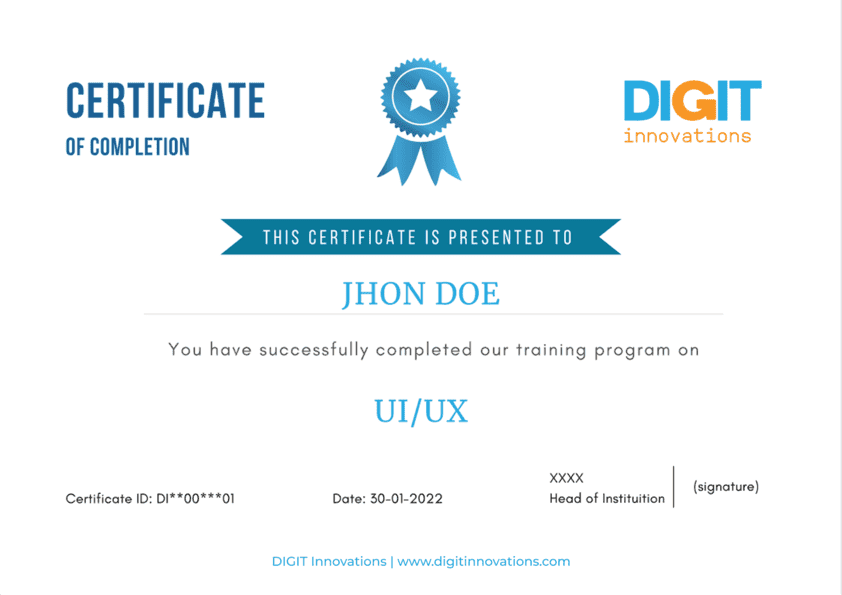
Global Industry Recognition
Our certifications are well-regarded in the software industry, providing valuable opportunities for career advancement
Practical Skill Validation
Our certifications validate your skills through practical application, equipping you for the workforce and demonstrating your expertise to employers.
Career Advancement
Achieve new heights in your professional journey with our certifications.
Shared Experiences from Our Students
Companies Hiring
DIGIT innovations Alumni
Our alumni work with leading companies worldwide, delivering real-world impact.










Join Our Upcoming
Live Batches
Secure your spot in the next batch. Limited seats available. Enroll now and start your learning journey with expert-led live training.
Loading Schedules...

FAQ
Frequently Asked Questions
Everything you need to know about the course. Find answers to common queries regarding enrollment, curriculum, and career paths.
Talk to usA UI / UX course provides hands-on training in designing intuitive interfaces, conducting user research, and applying industry-standard tools. It equips you with essential skills sought after by employers in tech and design industries.
Absolutely! We provide career support services including resume building, mock tests, mock interviews, and job placement assistance to help you kickstart your career in UI / UX Design.
Yes, our course includes hands-on projects and practical assignments that simulate real-world scenarios. You'll have the opportunity to apply your skills and build a real-time project.
Yes, we offer both in-person and online learning options. Our online platform provides access to course materials, lectures, and resources, allowing you to study at your own pace.
UI / UX designers can pursue roles such as UI designer, UX researcher, interaction designer, product designer, or UX/UI consultant in various industries including tech startups, digital agencies, and large corporations.
Enrolling is easy! Simply visit our website or contact our admissions team for more information on course schedules, fees, and enrollment procedures.